


Frigidaire
4.3816.00 Reviews
App Specs
- Version
- 4.29
- Updated On
- License
- Free
- Downloads
- 100,000+
- Developer
- AB Electrolux
- Categories
- House & Home
- Platform
- Android
Screenshots
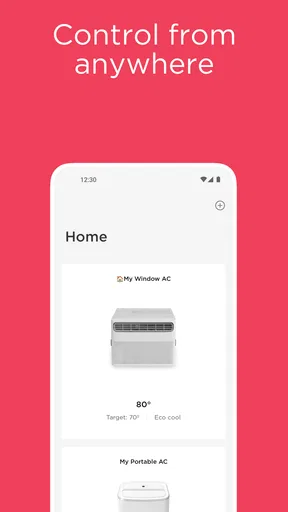
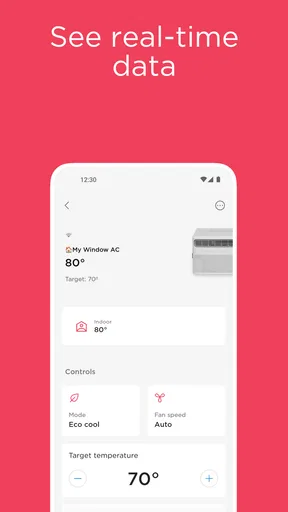
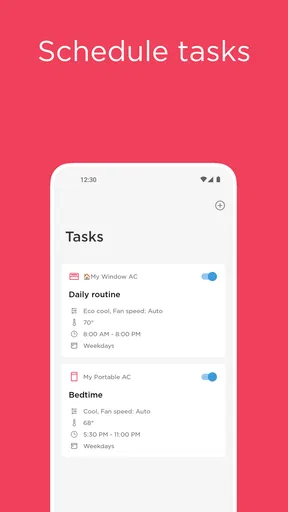
 Analysis by AppCompare
I think the value of a connected-appliance app is easiest to judge in the middle of an ordinary day: you are away from home, realize you meant to check a setting, and would rather not make a special trip back to the kitchen. That is the sort of small convenience Frigidaire is meant to provide. It is a free House & Home app from AB Electrolux for people with compatible connected Frigidaire appliances, and its usefulness depends much more on what is installed in your home than on how many smart-home gadgets you own.
Free to use, but only useful with the right appliance
There is no app price to weigh against a paid subscription in the facts available here: Frigidaire is free to download. That makes trying it a low-cost decision in the narrow sense, but it does not make a compatible connected appliance free. If you already own one, the app can add a control point without charging for access; if you do not, I would not buy an appliance solely on the promise of an app. The purchase decision should rest on the appliance itself, with phone control treated as an extra.
The app is rated for Everyone, and its current version is 4.23. It has a 4.4 average from around 4,600 ratings, with about 637 written reviews, and has been installed over 100,000 times. Those figures suggest that it has found an audience among connected-appliance owners, but they cannot tell you whether it will work with a particular model or suit your household routine. I would check appliance compatibility before making plans around any app-controlled function.
What the free access is worth in daily use
The strongest value is convenience rather than a dramatic change to how a kitchen works. Adjusting a setting from elsewhere can be useful when plans change, while maintenance reminders can make routine upkeep easier to remember. For someone who already has a connected Frigidaire appliance, those small moments may add up: the app can reduce the need to walk over and check a control, and it gives you a way to keep an eye on appliance-related tasks from your phone.
I would be cautious about treating energy information as a guaranteed way to lower a bill. Seeing usage can help you notice patterns and think about settings, but a tracker by itself does not create savings. The practical value depends on whether you look at the information and make a change that suits the appliance and your household. If you never check usage details, that part of the app may matter less than the everyday convenience of remote control or reminders.
Compared with relying only on the appliance’s own panel, phone access is useful when you are not in the kitchen. Compared with a general smart-home app, Frigidaire has a narrower purpose: it is intended for connected Frigidaire appliances, rather than being a universal hub for every brand and device. That focus may be welcome if you want appliance controls in one manufacturer’s app, but it is not a reason to expect broad control over an unrelated smart-home setup.
Getting Started with the Frigidaire App
First off, downloading and setting up the Frigidaire app is a breeze. Available on both Android and iOS, it’s just a tap away in your app store. Once you’ve got it installed, the setup wizard guides you through connecting your smart fridge to your phone. It’s as simple as connecting to Wi-Fi, and boom, you're ready to explore all the features.
Worth Reading Before You Choose

EA SPORTS FC Mobile 26 Is a Bigger Football Game, but It Takes Time

Flipboard Shows What News Apps Must Do Beyond the Feed

Switching to Android Auto Means Rethinking Your Driving Routine

Google Calendar Makes a Crowded Week Easier to Manage

Ludo King Makes the Most of the Minutes Between Plans

Baby Panda World Brings Quick Play to Modern Phones, but Its Game Library Feels Busy
Features That Make Life Easier
Let’s dive into some of the features that really stand out. One of the coolest (pun intended) is the ability to control your fridge from anywhere. Forgot to adjust the temperature before heading out? No worries! The app lets you tweak it remotely, ensuring your groceries stay fresh no matter where you are.
Another feature that caught my eye is the maintenance alerts. The app sends notifications if something needs attention, like a filter change. This proactive approach means fewer surprises and more peace of mind. Plus, with the energy usage tracker, you can monitor how much power your fridge is consuming and make adjustments to save on that electric bill.
Making the app part of a real routine
Here is a realistic use case: I leave for a weekend away, then remember that I wanted to review an appliance setting before settling in. Being able to check or adjust it from my phone is more useful than discovering the oversight after I get home. A maintenance notice can also serve as a prompt to put a filter task on my household list instead of relying on memory. These are modest gains, but they are specific ones; the app is most convincing when it saves a small interruption or helps a routine task happen on time.
A helpful habit is to treat notifications as reminders to verify, not as a substitute for paying attention to the appliance. If an alert appears, I would use it to decide what to check and then follow the appliance’s own guidance. Similarly, if I adjust a setting remotely, I would make a note of what I changed rather than repeatedly tapping controls because the phone has not refreshed immediately. That is especially sensible when connectivity is slow: a delayed update is a reason to pause and confirm, not to assume that several repeated commands have all taken effect.
The app is also more valuable when the person using it is the same person who handles basic appliance upkeep. A reminder is easy to act on when you know where the relevant filter or appliance information is, and less useful when household responsibilities are scattered among several people. In a shared home, agreeing who checks alerts can prevent duplicate effort or the assumption that someone else has already handled them.
User Interface: Simple and Intuitive
The user interface is sleek and intuitive. Navigation is straightforward, with everything neatly organized into tabs. Whether you’re tech-savvy or a newbie, you’ll find it easy to locate what you’re looking for. The app also supports multiple languages, which is a nice touch for non-English speakers.
One thing I really appreciate is the integration with voice assistants. You can use Alexa or Google Assistant to control your fridge with just your voice. It feels like living in the future, doesn’t it?
Where the convenience has limits
Remote control only helps when the appliance is compatible, connected, and reachable through the app. That dependence is the key trade-off: a phone can make access easier, but it also adds a connection between the appliance and your routine. If you prefer controls that work directly at the appliance without relying on a phone, the built-in controls remain the simpler option. I would keep them familiar, especially for settings that need an immediate change.
The app is a less compelling choice for someone who rarely changes appliance settings, does not want phone notifications, or expects one app to manage a mixed-brand home. In those cases, opening a manufacturer-specific app may feel like an extra step rather than a convenience. A general smart-home app may be better for organizing different brands, though it may not offer the same appliance-focused tools. The right comparison is not which app has the longest feature list; it is whether the controls you actually use are easier to reach in one place.
Connectivity is another practical consideration. A control that works remotely is only dependable when the appliance and phone can communicate. If the app takes time to sync, I would avoid relying on it for a last-second change when I am already in a hurry. I would try again once, then use the appliance’s own controls when I am home rather than spending time troubleshooting from a distance.
The same cautious approach applies to energy tracking. I would use it to observe, not to assume that a particular setting guarantees a lower bill. A household’s habits and the appliance’s use both affect the result, so the tracker is most useful as a prompt for informed adjustments. It is not a replacement for common sense about food storage or for checking that the appliance is operating as expected.
Who is likely to get the most from it?
I would recommend giving it a try if you already have a compatible connected Frigidaire appliance and you genuinely want remote access, upkeep reminders, or a way to review energy use. It is particularly suited to people who travel, have busy schedules, or share household tasks and want appliance information available away from the kitchen. The free price makes experimentation reasonable, provided expectations stay tied to the appliance and the functions you use.
I would skip it if you are shopping for a general home-control platform, if your appliances are not compatible, or if you prefer not to manage routine household tasks through a phone. It is also not a persuasive reason on its own to replace a working refrigerator. For someone who mainly wants reliable local operation, the normal appliance controls may already be enough; for someone who owns several brands, a broader home app may be a better starting point.
Room for Improvement?
Of course, no app is perfect, and the Frigidaire app is no exception. While it performs well overall, there are occasional connectivity issues. Sometimes, the app takes a little too long to sync with the fridge. It’s not a deal-breaker, but it can be a tad frustrating when you’re in a hurry.
Another area that could use some enhancement is the recipe section. While it’s a great idea to have recipes based on your fridge’s contents, the selection is somewhat limited. Expanding this feature would make meal planning a breeze.
Final Thoughts
All in all, the Frigidaire app is a solid companion for anyone with a smart fridge. Its remote control capabilities, maintenance alerts, and energy tracking are genuinely handy. Despite a few connectivity hiccups, the app delivers on its promise of convenience and efficiency.
So, if you’re looking to add a little more smart tech into your life, give the Frigidaire app a shot. It might just revolutionize the way you interact with your fridge. And who knows, it might save you a couple of bucks along the way!
Pros
- User-friendly interface for easy navigation.
- Customizable settings for personalized use.
- Seamless integration with smart home systems.
- Provides timely notifications and alerts.
- Energy-efficient features to save costs.
Cons
- Limited compatibility with older devices.
- Occasional glitches with remote access.
- Requires stable internet for optimal performance.
- Subscription needed for advanced features.
- Initial setup can be time-consuming.
FAQs for Frigidaire
What features does the Frigidaire app offer?
The Frigidaire app provides a wide range of features, including remote control of your appliances, scheduling, and monitoring energy usage. It also offers maintenance reminders and troubleshooting guides. This app is designed to enhance convenience and efficiency, allowing users to manage their home appliances seamlessly from their smartphones.
Is the Frigidaire app compatible with all Frigidaire appliances?
The Frigidaire app is compatible with many, but not all, Frigidaire appliances. Before downloading, check if your specific model supports app connectivity. Generally, newer models with smart technology will be compatible. The app's compatibility information can be found on the official Frigidaire website or the product's manual.
How user-friendly is the Frigidaire app?
The Frigidaire app is designed with user-friendliness in mind. It offers a clean interface with intuitive navigation, making it easy for users of all tech levels to operate. The app also includes setup assistance and guided tutorials to help you get started with managing your appliances efficiently.
What are the privacy and security features of the Frigidaire app?
The Frigidaire app prioritizes user privacy and security by employing encryption protocols and secure login processes. It ensures that your data is protected from unauthorized access. Users are encouraged to keep the app updated to benefit from the latest security enhancements and privacy features.
Are there any costs associated with using the Frigidaire app?
The Frigidaire app is free to download and use. However, it requires a stable internet connection, which might incur data costs depending on your mobile plan. Additionally, while the app itself is free, certain advanced features might only be available with specific appliance models.


